Sunrise 2027: how to add a GS1 Digital Link QR code to your packaging
Checkouts are moving to 2D barcodes by the end of 2027, and the packaging you print this year will still be on shelves then. This guide shows the GTINs, sizes, placement and links you need for a QR code that scans at the register and opens your page on a phone.
DLCode · Updated · 7 min read
Read before you send packaging to print
Pick the wrong QR tool and you're paying rent on your packaging forever — or reprinting.
- QR subscriptions ($900–$2,940 through 2030): Cancel and your printed packs go dead. Custom domains cost $500–$2,000/yr extra.
- Free static generators: No hosted resolver — you can't fix a broken link or show a recall notice after printing.
What DLCode gives you instead (not just a QR image):
- Hosted through December 31, 2030, paid once. From $249 for 25 products, unlimited scans, $0/month.
- Free domain in your name. Own the URL in the ink — move anytime with zero reprints.
- Changeable hosted product page. Update where scans go anytime (store, ingredients, country page).
- Single-batch recalls. Warn only shoppers holding a bad lot. Passes 56/56 GS1 checks.
Unlimited scans, no watermark, 30-day free trial of lot codes & recalls. Paid packs from $249 once.
Paste your barcode number to preview your exact print-ready file.
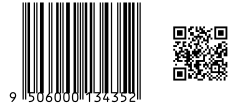
- At checkout
- Rings up GTIN 9506000134352
- On a phone
- Hosted page, redirect, or batch recall notice
- Print file
- 1:1 SVG, PDF & EPS · 0.495 mm · 4 mm gap
- Ownership
- Your domain · hosted through 2030 · zero lock-in
What Sunrise 2027 is
Sunrise 2027 is the GS1 US name for the transition from linear barcodes, such as the UPC, to 2D barcodes, such as QR codes, on retail products. GS1 US announced it on January 12, 2022, and describes the 2027 timeline as set by the retail industry in collaboration with GS1 US.
The global goal, which GS1 calls Ambition 2027, is for retail point-of-sale scanning to read and process the GTIN from both existing linear barcodes and 2D barcodes by the end of 2027. GS1 US describes a phased Crawl-Walk-Run approach. Packaging stays on shelves and in homes for years, so the artwork you approve now is the artwork those scanners will read.
For a brand, the practical change is small. You keep your UPC or EAN and add a QR code that uses GS1 Digital Link syntax. That QR code holds your GTIN inside a web address, so one code can ring up at an updated register and open a web page on a shopper's phone.
What you need before you start
You need a GTIN for each product. The GTIN is the number already under your UPC or EAN, and the same number goes into the QR code. GS1 US states that when you license a GS1 US GTIN, your company is uniquely and exclusively identified as the owner of that number.
Get your GTINs from GS1. GS1 US warns that GTINs not issued directly by GS1 may be linked to another company and do not comply with GS1 standards. A QR code built on such a number carries the same problem.
GS1 US lists these prices for US companies. Larger prefixes for 10,000 and 100,000 GTINs are also available.
| What you buy | Number of GTINs | Initial fee | Annual renewal |
|---|---|---|---|
| Single GTIN | 1 | $30 | $0 |
| GS1 Company Prefix | 10 | $250 | $50 |
| GS1 Company Prefix | 100 | $750 | $150 |
| GS1 Company Prefix | 1,000 | $2,500 | $500 |
You also need a web domain and a service that answers it. GS1 calls this service a resolver. A GS1-conformant resolver connects a GS1 identifier, such as your GTIN, to one or more sources of information about the product.
The domain is printed into the code, so it has to keep working for as long as your packaging is on shelves and in homes. If that domain stops answering, every printed code breaks and the only fix is a reprint. Put your codes on a domain you control.
Don't print a QR code tied to a monthly subscription.
Stop paying a monthly QR tool and every box on shelves breaks. DLCode hosts your codes through 2030 on your own domain, with instant link edits and batch recalls.
How to put the code on your packaging
Keep your UPC or EAN. The GS1 retail guideline states that products with a retail 2D barcode need a linear barcode as well until 90% of point-of-sale scanning solutions can use GS1 compliant 2D barcodes. It also states that linear barcodes will not go away and will coexist with 2D barcodes for as long as there are uses for them.
Size the QR code by its module, also called the X-dimension. A module is one square of the code. The GS1 General Specifications, as reproduced in the GS1 retail guideline, set these values for a QR code with GS1 Digital Link syntax on trade items scanned at general retail point of sale.
| Specification | Value |
|---|---|
| Minimum module size | 0.396 mm (0.0150 in) |
| Target module size | 0.495 mm (0.0195 in) |
| Maximum module size | 0.990 mm (0.0390 in) |
| Quiet zone | 4 modules on all four sides (1.980 mm at 0.495 mm) |
| Minimum print quality | 1.5/12/660 |
| URI form | Uncompressed GS1 Digital Link URI |
These 2D module sizes are 1.5 times the equivalent sizes for linear barcodes, because optical effects in image capture require larger modules. The overall size of the code depends on the module size and on how many characters the web address contains. A shorter domain gives a smaller code at the same module size.
Place the QR code close to the linear barcode. GS1 reports that extensive, independent testing showed the 2D barcode needs to be within 50 mm of the centre of the linear barcode for checkouts to reach their target of 40 to 70 items per minute.
The register charges once. Under the minimum scanner mode for Ambition 2027, an updated scanner transmits the first GTIN it identifies with a single beep, even when the pack carries both a linear and a 2D barcode.
- Get the GTIN and the destination domain for the product.
- Generate the QR code as vector artwork at a 0.495 mm module, with the 4-module quiet zone included.
- Place the artwork at 1:1 scale, within 50 mm of the centre of the UPC or EAN, with nothing printed inside the quiet zone.
- Print a proof on the real packaging material.
- Scan the proof with several phones and check that each one opens the right page. The GS1 guideline notes that barcode verification does not check where a 2D code sends the user, so you have to test this separately.
- Grade the code with a barcode verifier if your printer or a lab has one. The GS1 guideline highly recommends verification, and it calls for each modified 2D barcode, for example one with colours or a logo, to be verified to ISO/IEC 15415.
What to link to
A GS1 Digital Link QR code can send each scan to a different page, depending on what the shopper or app asks for. GS1 defines standard link types in its Web Vocabulary so that apps and resolvers can request the same kind of content in the same way. The default link is the one a resolver redirects to unless the request contains information that is a better match.
| Link type | What it points to |
|---|---|
| gs1:defaultLink | The page a resolver redirects to unless the request matches another link better |
| gs1:pip | A product information page for consumers, typically run by the brand owner or a retailer |
| gs1:ingredientsInfo | Facts about ingredients |
| gs1:allergenInfo | Allergen information |
| gs1:instructions | Instructions, such as assembly instructions or usage tips |
| gs1:registerProduct | A page to register ownership of the product, including for a warranty |
| gs1:recallStatus | Information on whether the product has been recalled, typically an API |
Start with one good product page as the default link. Add other link types when you have the content. If you sell in more than one country, send shoppers to the page for their country or language, so that one printed code works in each market.
Because the destination lives in the resolver, you can change it after printing. Make sure your provider lets you do this, and that every link still opens a working page.
Why lot codes matter
A GS1 Digital Link URI can hold more than the GTIN. It can also hold a batch or lot number, using GS1 Application Identifier (10). The GS1 retail guideline lists more effective targeted recalls as one of the benefits of adding this data to the barcode, and it states that the batch or lot number is required to start a targeted recall.
With the lot in the code, the link can lead to a page specific to that lot. If a single lot has a problem, shoppers who scan a pack from that lot can see a recall notice, and shoppers with a pack from a different lot see the normal product page. Without the lot, every scan of the GTIN gets the same page, so a recall notice for one bad batch shows on every pack you sold.
Lot codes also connect to the US FDA Food Traceability Rule. The rule requires records of key data elements for foods on the Food Traceability List, linked to a traceability lot code that uniquely identifies each traceability lot. FDA proposed moving the compliance date from January 20, 2026 to July 20, 2028, and the Continuing Appropriations Act of 2026 directed FDA not to enforce the rule before that date. The same lot numbers can serve your traceability records and your QR code.
A lot in the code means a different code for each batch. The GS1 guideline notes that static data such as the GTIN often arrives pre-printed from packaging suppliers, while batch or lot codes are usually printed on demand at the plant or production line. Plan this with your printer before you add the lot to the QR code.
Get Sunrise 2027 codes ready for your next print run
DLCode turns each GTIN into a print-ready GS1 Digital Link QR code and runs the resolver behind it, so your packs ring up at the register and open your page on a phone.
- One vector file per product (SVG, PDF or EPS) with your UPC-A, EAN-13 or EAN-8 and the QR code 4 mm apart, at 1:1 scale, with 0.495 mm modules, the 4-module quiet zone and a validated check digit.
- Change where any code goes at any time, with no reprint.
- Put codes on your own domain, such as qr.yourbrand.com, on every plan.
- Paid packs add lot codes in the QR code and lot-level recalls, so a recall notice reaches only the affected batch.
- Paid packs also send each scan to a page for the shopper's country or language, so one printed code works in every market.
- Check existing artwork with the free packaging checker at /check. Your files stay in your browser.
Start free for 10 products with no card. One-time packs start at $249 for 25 products and include hosting and unlimited scans through December 31, 2030. There is no subscription. Every new account also gets lot codes, recalls and country pages free for 30 days.
Add the code before your next print run. Start free and get your first print file today, or See pricing.
Sources
- What is GS1 Sunrise 2027? · GS1 US
- Retail industry to transition from U.P.C. to two-dimensional barcodes on product packaging by 2027 · GS1 US
- 2D Barcodes at Retail Point-of-Sale Implementation Guideline, Release 1.0 · GS1
- Get UPC barcodes (pricing) · GS1 US
- GS1 Company Prefix, barcodes, and identification FAQ · GS1 US
- Barcodes for Amazon · GS1 US
- GS1 Web Vocabulary link types · GS1
- FSMA Final Rule on Requirements for Additional Traceability Records for Certain Foods · U.S. Food and Drug Administration
Get your QR code
Get a print-ready file with your barcode and a GS1 Digital Link QR code side by side. 10 products free, and pack features free for 30 days. No card. Then pay once from $249.